Actions
Bug #5836
closed
JK
PA
Editbox breaks after sending mutiple lines, then typing causes an exception
Bug #5836:
Editbox breaks after sending mutiple lines, then typing causes an exception
Start date:
04/27/2026
Due date:
% Done:
0%
Estimated time:
Operative System:
All
Regression:
Yes
Description
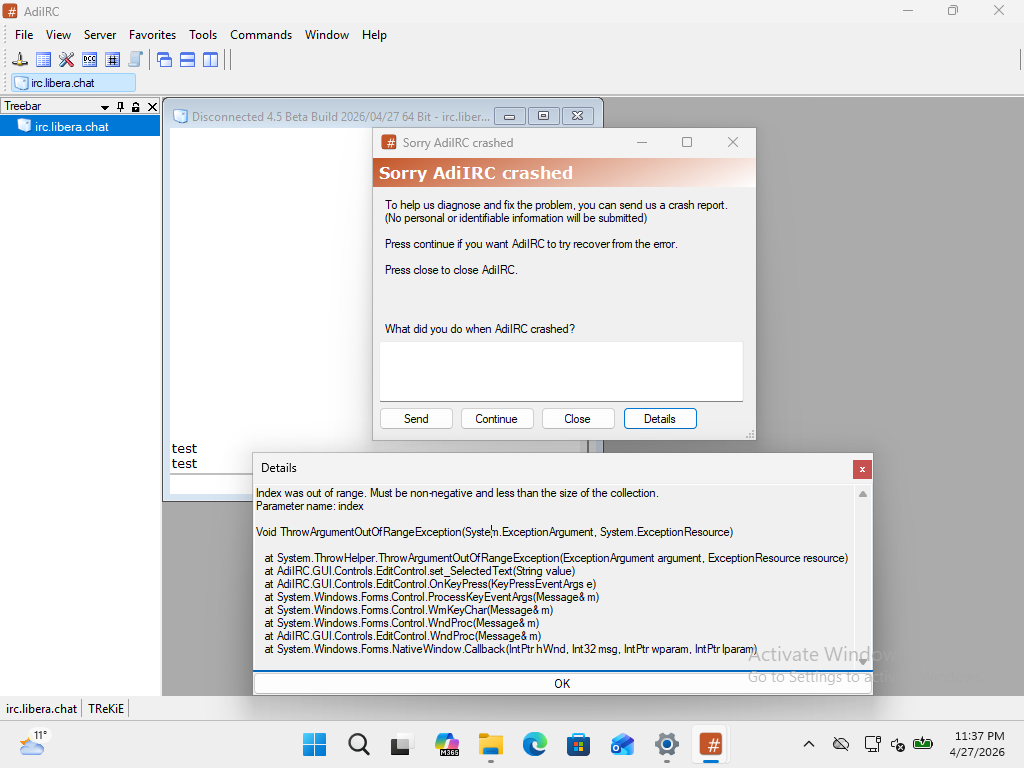
When pasting (or typing) a mutiline text string into the editbox, after sending the text, the text insertion cursor moves several pixels to the left, and then when typing into the textbox, the following exception is caused:
Index was out of range. Must be non-negative and less than the size of the collection.
Parameter name: index

Void ThrowArgumentOutOfRangeException(System.ExceptionArgument, System.ExceptionResource)

   at System.ThrowHelper.ThrowArgumentOutOfRangeException(ExceptionArgument argument, ExceptionResource resource)
   at AdiIRC.GUI.Controls.EditControl.set_SelectedText(String value)
   at AdiIRC.GUI.Controls.EditControl.OnKeyPress(KeyPressEventArgs e)
   at System.Windows.Forms.Control.ProcessKeyEventArgs(Message& m)
   at System.Windows.Forms.Control.WmKeyChar(Message& m)
   at System.Windows.Forms.Control.WndProc(Message& m)
   at AdiIRC.GUI.Controls.EditControl.WndProc(Message& m)
   at System.Windows.Forms.NativeWindow.Callback(IntPtr hWnd, Int32 msg, IntPtr wparam, IntPtr lparam)
You can avoid the issue occurring by immediately clicking into the editbox area after sending, which moves the text insertion cursor several pixels to the right, and typing will then not result in an exception.
See this APNG animation below - observe the text insertion cursor in the editbox before pasting, after, and when clicking back into the editbox:
(See Notes below for more observations.)
Repro
- Open AdiIRC
- Dismiss Quick Connection window
- Copy the following to your clipboard:
/echo -ag test/echo -ag test - Select the status window editbox if not already in focus, and press Ctrl-V or right-click and choose Paste
- After the text appears in the editbox, press Enter or right-click and choose Submit
- Immediately press any key into the editbox, you should get the exception above
Notes
- You can paste/send another multiline string, but only one line will be sent and it will not appear in the editbox.
- Recovery is possible without re-opening the window. Once the editbox is broken and Continue is pressed at the exception dialog, if you paste more text into the editbox, and then resize the window, the editbox will fix itself until the next mutiline attempt.
- If you write multiline text using alt-enter, the same issue occurs.
- Changing how many lines are showing in the editbox in Options doesn't workaround the issue.
Screenshot
Files
PA Updated by Per Amundsen about 2 months ago
- Status changed from New to Resolved
Thanks, should be fixed in next beta.
PA Updated by Per Amundsen about 2 months ago
- Status changed from Resolved to Closed
Actions